defmodule LiveSelect do
alias LiveSelect.ChangeMsg
import Phoenix.Component
# for backward compatibility with LiveView 0.17
# generates compile warning if run with LiveView 0.18
import Phoenix.LiveView.Helpers
@moduledoc ~S"""
The `LiveSelect` field is rendered by calling the `live_select/3` function and passing it a form and the name of the field.
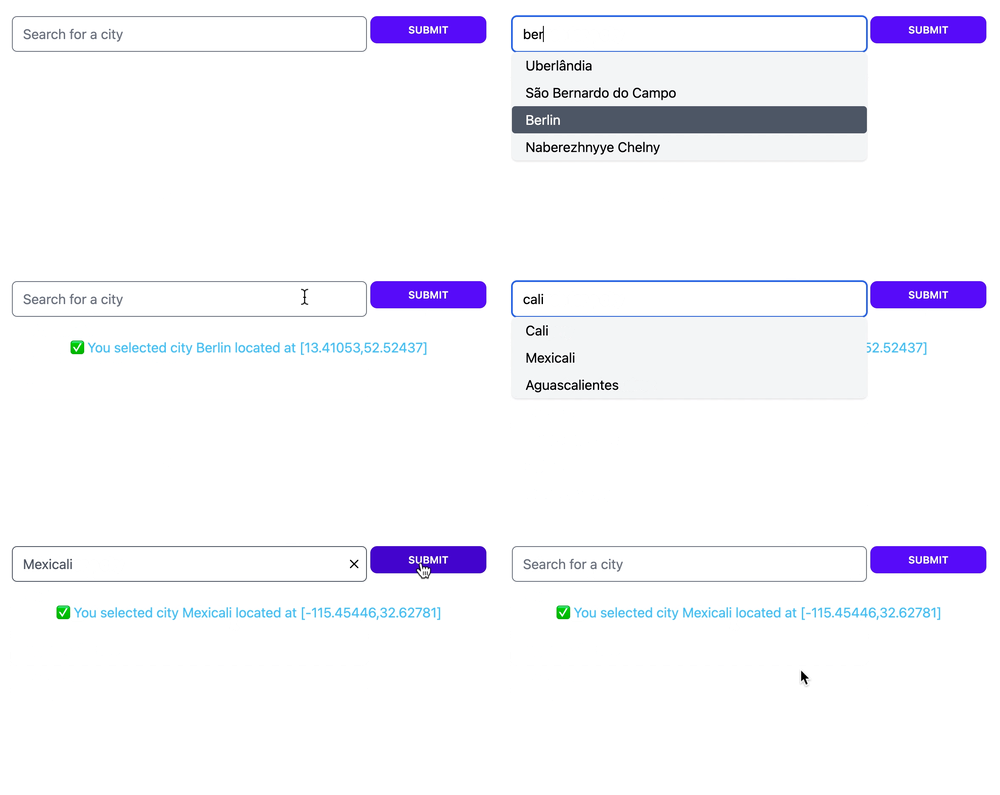
LiveSelect creates a text input field in which the user can type text, and hidden input field(s) that will contain the value of the selected option(s).
As the input text changes, LiveSelect will render a dropdown below the text input containing the matching options, which the user can then select.
Selection can happen either using the keyboard, by navigating the options with the arrow keys and then pressing enter, or by
clicking an option with the mouse.
Whenever an option is selected, `LiveSelect` will trigger a standard `phx-change` event in the form. See the "Examples" section
below for details on how to handle the event.
After an option has been selected, the selection can be undone by clicking on the text field. In tags mode, single tags can be removed by clicking on them.
### Single mode
element with multiple attribute](https://developer.mozilla.org/en-US/docs/Web/HTML/Attributes/multiple) would do.
## Examples
These examples describe all the moving parts in detail. You can see these examples in action, see which messages and events are being sent, and play around
with the configuration easily with the [showcase app](https://github.com/maxmarcon/live_select#showcase-app).
### Single mode
The user can search for cities.
The LiveSelect main form input is called `city_search`.
When a city is selected, the coordinates of that city will be the value of the form input.
The name of the selected city is available in the text input field named `city_search_text_input`.
Template:
```
<.form for={:my_form} :let={f} phx-change="change">
<%= live_select f, :city_search %>
```
LiveView:
```
import LiveSelect
@impl true
def handle_info(%LiveSelect.ChangeMsg{} = change_msg, socket) do
cities = City.search(change_msg.text)
# cities could be:
# [ {"city name 1", [lat_1, long_1]}, {"city name 2", [lat_2, long_2]}, ... ]
#
# but it could also be (no coordinates in this case):
# [ "city name 1", "city name 2", ... ]
#
# or:
# [ [label: "city name 1", value: [lat_1, long_1]], [label: "city name 2", value: [lat_2, long_2]], ... ]
#
# or even:
# ["city name 1": [lat_1, long_1], "city name 2": [lat_2, long_2]]
update_options(change_msg, cities)
{:noreply, socket}
end
@impl true
def handle_event(
"change",
%{"my_form" => %{"city_search_text_input" => city_name, "city_search" => city_coords}},
socket
) do
IO.puts("You selected city #{city_name} located at: #{city_coords}")
{:noreply, socket}
end
```
### Tags mode
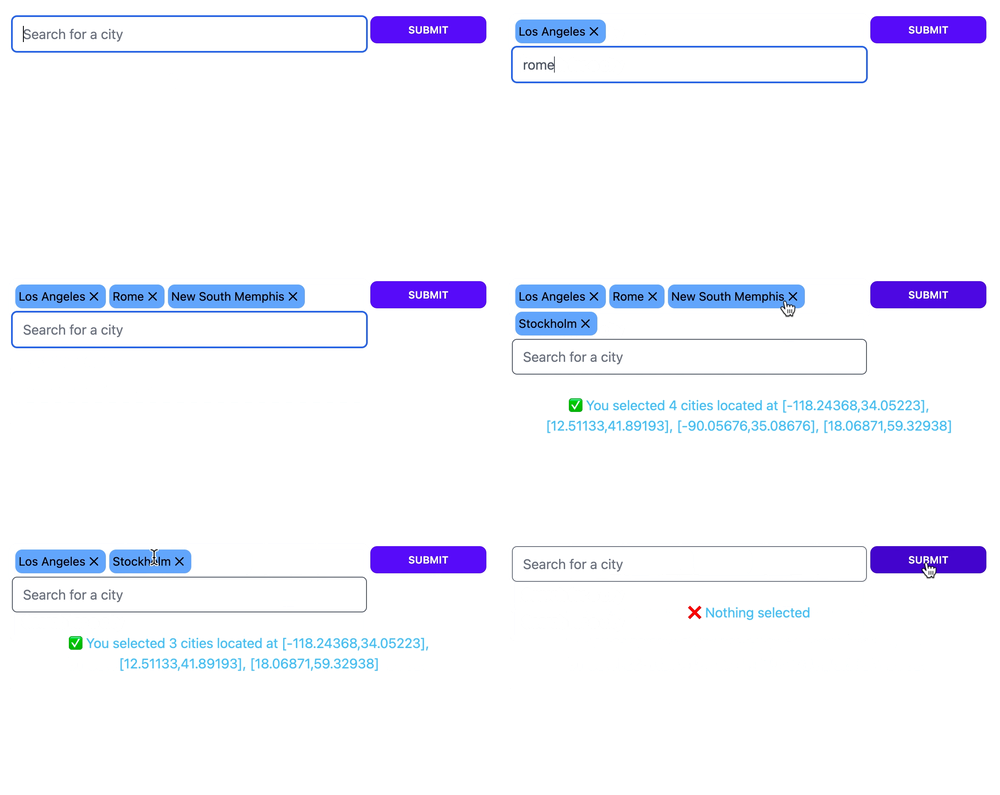
Let's say you want to build on the previous example and allow the user to select multiple cities and not only one. You can use `:tags` mode for it:
Template:
```
<.form for={:my_form} :let={f} phx-change="change">
<%= live_select f, :city_search, mode: :tags %>
```
LiveView:
```
@impl true
def handle_event(
"change",
%{"my_form" => %{"city_search" => list_of_coords}},
socket
) do
# list_of_coords will contain the list of the coordinates of the selected cities, for example:
# ["[-46.565,-23.69389]", "[-48.27722,-18.91861]"]
IO.puts("You selected cities located at: #{list_of_coords}")
{:noreply, socket}
end
```
### Multiple LiveSelect inputs in the same LiveView
If you have multiple LiveSelect inputs in the same LiveView, you can distinguish them based on the field.
For example:
Template:
```
<.form for={:my_form} :let={f} phx-change="change">
<%= live_select f, :city_search %>
<%= live_select f, :album_search %>
```
LiveView:
```
@impl true
def handle_info(%LiveSelect.ChangeMsg{} = change_msg, socket) do
options =
case change_msg.field do
:city_search -> City.search(change_msg.text)
:album_search -> Album.search(change_msg.text)
end
update_options(change_msg, options)
{:noreply, socket}
end
```
"""
@doc ~S"""
Renders a `LiveSelect` input in a `form` with a given `field` name.
LiveSelect renders two inputs: a hidden input (of type either text or select, depending on the specified mode) named `field` that holds the value of the selected option(s),
and a visible text input field named `#{field}_text_input` that contains the text entered by the user.
**Opts:**
* `mode` - either `:single` (for single selection, the default), or `:tags` (for multiple selection using tags)
* `default_value` - default value to send to the server if nothing is selected. Only used in `:single` mode, defaults to an empty string
* `disabled` - set this to a truthy value to disable the input field
* `placeholder` - placeholder text for the input field
* `debounce` - number of milliseconds to wait after the last keystroke before sending a `t:LiveSelect.ChangeMsg.t/0` message. Defaults to 100ms
* `update_min_len` - the minimum length of text in the text input field that will trigger an update of the dropdown. It has to be a positive integer. Defaults to 3
* `style` - one of `:tailwind` (the default), `:daisyui` or `:none`. See the [Styling section](styling.html) for details
* `active_option_class`, `container_class`, `container_extra_class`, `dropdown_class`, `dropdown_extra_class`, `option_class`, `option_extra_class`, `text_input_class`, `text_input_extra_class`, `text_input_selected_class`,`selected_option_class`, `tag_class`, `tag_extra_class`, `tags_container_class`, `tags_container_extra_class` - see the [Styling section](styling.html) for details
"""
def live_select(form, field, opts \\ [])
when (is_binary(field) or is_atom(field)) and is_list(opts) do
form_name = if is_struct(form, Phoenix.HTML.Form), do: form.name, else: to_string(form)
assigns =
opts
|> Map.new()
|> Map.put(:id, "#{form_name}_#{field}_component")
|> Map.put(:module, LiveSelect.Component)
# Ecto forms expect atom fields:
# https://github.com/phoenixframework/phoenix_ecto/blob/master/lib/phoenix_ecto/html.ex#L123
|> Map.put(:field, String.to_atom("#{field}"))
|> Map.put(:form, form)
~H"""
<.live_component {assigns} />
"""
end
@doc ~S"""
Updates a `LiveSelect` component with new options. `change_msg` must be the `t:LiveSelect.ChangeMsg.t/0` originally sent by the LiveSelect,
and `options` is the new list of options that will be used to fill the dropdown.
Each option will be assigned a label, which will be shown in the dropdown, and a value, which will be the value of the
LiveSelect input when the option is selected.
`options` can be any enumerable of the following elements:
* _atoms, strings or numbers_: In this case, each element will be both label and value for the option
* _tuples_: `{label, value}` corresponding to label and value for the option
* _maps_: `%{label: label, value: value}` or `%{value: value}`
* _keywords_: `[label: label, value: value]` or `[value: value]`
In the case of maps and keywords, if only `value` is specified, it will be used as both value and label for the option.
Because you can pass a list of tuples, you can use maps and keyword lists to pass the list of options, for example:
```
%{Red: 1, Yellow: 2, Green: 3}
```
Will result in 3 options with labels `:Red`, `:Yellow`, `:Green` and values 1, 2, and 3.
Note that the option values, if they are not strings, will be JSON-encoded. Your LiveView will receive this JSON-encoded version in the `phx-change` and `phx-submit` events.
## Alternative tag labels
Sometimes, in `:tags` mode, you might want to use alternative labels for the tags. For example, you might want the labels in the tags to be shorter
in order to save space. You can do this by specifying an additional `tag_label` key when passing options as map or keywords. For example, passing these options:
```
[%{label: "New York", tag_label: "NY"}, %{label: "Barcelona", tag_label: "BCN"}]
```
will result in "New York" and "Barcelona" to be used for the options in the dropdown, while "NY" and "BCN" will be used for the tags.
"""
def update_options(%ChangeMsg{} = change_msg, options) do
Phoenix.LiveView.send_update(change_msg.module, id: change_msg.id, options: options)
end
end
 ### Tags mode
 ## Reacting to user's input
Whenever the user types something in the text input, LiveSelect sends a `t:LiveSelect.ChangeMsg.t/0` message to your LiveView.
The message has a `text` property containing the current text entered by the user, and a `field` property with the name of the LiveSelect field.
The LiveView's job is to [`handle_info/2`](`c:Phoenix.LiveView.handle_info/2`) the message and then call `update_options/2`
to update the dropdown's content with the new set of selectable options. See the "Examples" section below for details.
## Multiple selection with tags mode
When `:tags` mode is enabled `LiveSelect` allows the user to select multiple entries. The entries will be visible above the text input field as removable tags.
The selected entries will be passed to your live view's `change` and `submit` events as a list of entries, just like an [HTML
## Reacting to user's input
Whenever the user types something in the text input, LiveSelect sends a `t:LiveSelect.ChangeMsg.t/0` message to your LiveView.
The message has a `text` property containing the current text entered by the user, and a `field` property with the name of the LiveSelect field.
The LiveView's job is to [`handle_info/2`](`c:Phoenix.LiveView.handle_info/2`) the message and then call `update_options/2`
to update the dropdown's content with the new set of selectable options. See the "Examples" section below for details.
## Multiple selection with tags mode
When `:tags` mode is enabled `LiveSelect` allows the user to select multiple entries. The entries will be visible above the text input field as removable tags.
The selected entries will be passed to your live view's `change` and `submit` events as a list of entries, just like an [HTML